Digital truck customization platforms give learners and hobbyists a practical way to try out vehicle modifications online. Users can change a truck’s look, swap out parts, and see the results before making any real-world choices. Anyone interested in automotive design or wanting to build digital customization skills needs to know what each platform offers and where it falls short.
Key Platforms for Virtual Truck Customization
Many websites and apps deliver virtual truck customization, each with its own set of features and learning benefits. Automobiles.honda.com is Honda’s official platform, so it’s a solid pick for those focused on Honda vehicles. The interface is simple, and users can save or share their builds. Still, options are limited to Honda models, and the modification range is narrower than on some other sites. Access is free, and the link to Honda dealerships can help users see how digital builds connect to actual purchases.
Honda’s online vehicle-building tool, available at Honda Canada, works as a retail configuration system, not a general truck-design simulator. Users pick a vehicle and trim, set available options, and get a price summary. The tool separates MSRP from a broader “Selling Price” that can include freight, pre-delivery inspection, levies, fees, and dealer charges, with taxes listed separately. Honda notes that estimated payments are for reference and don’t count as a financing or purchase offer. The configurator breaks down prices, letting users show either MSRP-only numbers or a Selling Price with extra fees. The interface includes provincial selection since some charges change by province or dealer, and users can add sales taxes to the estimate. This setup helps teach the difference between a vehicle’s advertised base price and its estimated transaction price. The system is model-specific and doesn’t act as an open modification sandbox. Instead, it shows manufacturer-approved configuration logic and how automakers bundle trims and factory options. For instance, the 2026 Honda Ridgeline comes in Sport, TrailSport, and Black Edition trims, starting at $42,290, with the Black Edition 2-Tone topping out at $49,390. The Ridgeline features a 3.5-liter V6 with 280 horsepower and 262 pound-feet of torque, a nine-speed automatic transmission, and a 5,000-pound towing capacity with standard all-wheel drive, according to Kelley Blue Book.
Ultrawheel.com focuses on truck wheels, offering clear visuals and a user-friendly interface. It’s best for checking out wheel options, but doesn’t support broader truck mods or saving builds. The truck model selection is limited, so it’s mainly for learning about wheel customization. Manufacturer configurators like Honda’s and aftermarket visualizers such as Ultrawheel serve different needs: Honda’s tool connects to current inventory, trim structures, pricing, and dealer sales, while a wheel visualizer zeroes in on appearance and fitment choices.
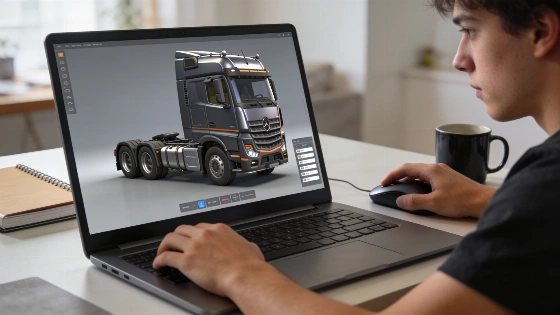
Interactivegarage.com and 3dtuning.com both offer more advanced customization. Interactivegarage.com has a 3D truck builder and lets users save and share builds. It’s a paid service, and the number of vehicle models is limited. 3dtuning.com provides similar features but also charges for full access. Both are useful for learners wanting to try a wider range of mods and practice digital design workflows. Any claims about pricing or paid access should be checked directly with the platforms’ official info.
For those who want a gamified approach, Big Rig Racing and Gigabit Offroad provide interactive spaces where users can customize trucks and take on challenges. Big Rig Racing is free with in-app purchases and offers many options, though some features may take time or extra spending to unlock. Gigabit Offroad focuses on realistic off-roading and multiplayer, but older devices might not work, and multiplayer needs an internet connection.
Educational Value and Practical Considerations
Platforms like Autobytel and gmfleet.com target users who want to explore official vehicle configurations. Autobytel is free and lets users save and share builds, but the vehicle selection is limited. Gmfleet.com centers on GM vehicles and gives more customization within that brand. These tools help learners see how manufacturers present customization choices and how digital tools can guide decisions. Honda’s digital sales process, for example, treats configuration as a mix of vehicle grade, technical specs, and approved equipment, letting learners compare how manufacturers organize option trees, though not every accessory can be installed on every trim.
Apps like Formacar Custom 3D Tuning and NFS Heat Studio bring in features such as augmented reality (AR) and cross-platform use. Formacar Custom 3D Tuning is iOS-only, supports AR, and gives a 3D truck view, but it’s a paid app with limited truck models and mods. NFS Heat Studio is free, works on iOS and Android, and lets users share builds. However, it requires the main game "Need for Speed Heat," which must be bought separately.
Other options include Poki.com, which hosts truck games for easy access, and Car Mechanic Simulator, a paid app that offers a realistic simulation and learning experience with various vehicles. Car Master 3D gives more customization and good graphics for free, though some features cost extra and the platform covers less ground.
Comparing Features and Suitability for Learning
When picking a virtual truck customization platform, weigh these factors:
- Supported vehicle brands and models: Some platforms stick to certain manufacturers, while others cover more ground.
- Customization depth: The range of mods goes from wheels and paint to full 3D builds.
- Device compatibility: Make sure the platform works on your device and operating system.
- Cost and access: Free platforms may limit features, while paid ones often offer more options and better graphics.
- Educational features: Look for platforms that let you save, share, and experiment with builds to support learning and creativity.
For programming education and digital skills, these platforms can introduce learners to 3D modeling, user interface design, and interactive graphics basics. Trying out virtual customization tools also helps users see how digital workflows support real-world choices in automotive design and engineering.