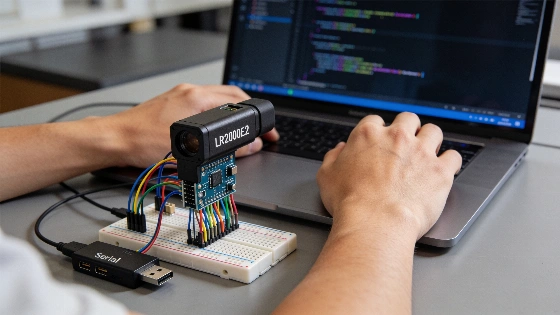
Getting reliable distance readings from a laser rangefinder often comes down to handling protocol details that can trip up even experienced users. The ERDI LR2000E2 is a 905 nm UART laser rangefinder module built for long-range use, with a stated range of 4 to 2,000 meters and adaptive measurement rates. This guide walks through wiring the module, understanding its protocol, and building a Python reader based on official documentation and independent technical checks to help avoid common mistakes.
Understanding the LR2000E2 Module
The LR2000E2 covers distances from 4 to 2,000 meters, with accuracy listed as ±1 meter up to 400 meters and 0.4% of the measured value beyond that. Its measurement rate shifts between 2 and 10 Hz, which fits applications needing long-range sensing where speed is less important. The module uses UART-TTL at 115200 baud with 8 data bits and needs a supply voltage between 3.3 and 5 V. While the LR2000E2 is marketed as a compact long-range sensor, its update rate is much lower than some rivals like the TF03, which is rated up to 7 kHz, according to the ERDI LRF product-information team (ERDI LRF comparison). The device communicates using an 8-byte binary protocol, with each frame starting with a 55 AA header and the distance reported in tenths of a meter.
Wiring the Module
The LR2000E2 uses a 6-pin connector. The main connections are:
- Pin 1 (GND): Power ground
- Pin 2 (VCC): Power supply (3.3–5 V)
- Pin 4 (TXD): Module transmit (to host)
- Pin 5 (RXD): Host transmit (to module)
- Pin 6 (SW-SHOT): Enable input (active high)
Before wiring, check the logic level of TXD and RXD if your microcontroller or USB-serial adapter only supports 3.3 V. The SW-SHOT line must be held high for the module to work. Make sure your power supply can handle inrush currents up to 400 mA, or you might see startup problems that look like communication failures. ERDI technical guidance points out that UART framing, supply voltage, mechanical fit, thermal path, and payload mass all matter for embedded use (ERDI LRF technical guidance).
Protocol Overview
The LR2000E2 uses 8-byte frames for communication. Each command starts with a header (55 AA), then a function code, four data bytes, and a checksum. The checksum is the low byte of the sum of the function code and the four data bytes. The module replies with an 8-byte frame, where the third byte (STA) shows success (1) or failure (any other value). The measured distance is in two bytes (DIS_H and DIS_L), combined as DIS_H * 256 + DIS_L. All distance values are multiplied by 10, so divide by 10 to get meters. The protocol at the application level sets how commands and measurement data are arranged, and UART speed alone does not guarantee modules will work together, since headers, commands, checksums, and payload layouts can differ (ERDI TECH protocol explainer).
Supported Commands
CommandBytesSingle-shot ranging | 55 AA 88 FF FF FF FF 84
Continuous ranging | 55 AA 89 FF FF FF FF 85
Stop ranging | 55 AA 8E FF FF FF FF 8A
Angle measurement | 55 AA 8A FF FF FF FF 86
Check the checksum for each command by adding the function code and data bytes, then taking the low byte. ERDI’s protocol documentation notes that request and response frames may use different checksum ranges, so a Python implementation must treat frame structure, command byte, checksum rule, and distance scaling as specific to the model, not just inferred from baud rate.
Python Implementation Example
The Python code below shows how to talk to the LR2000E2 using the pyserial library. This example handles frame sync, checksum checks, and treats failed readings as normal cases.
import time
import serial

HEADER = b"\x55\xAA"

def build(function: int, data: bytes = b"\xFF\xFF\xFF\xFF") -> bytes:
    body = bytes([function]) + data
    return HEADER + body + bytes([sum(body) & 0xFF])

CMD_SINGLE = build(0x88)
CMD_CONT = build(0x89)
CMD_STOP = build(0x8E)

class Reading:
    def __init__(self, ok, metres=None, raw=b""):
        self.ok, self.metres, self.raw = ok, metres, raw
    def __repr__(self):
        return f"Reading(ok={self.ok}, metres={self.metres})"
    @staticmethod
    def parse(frame: bytes, strict: bool = False) -> 'Reading':
        if len(frame) != 8 or frame[:2] != HEADER:
            return Reading(False, raw=frame)
        if strict and (sum(frame[:7]) & 0xFF) != frame[7]:
            return Reading(False, raw=frame)
        if frame[3] != 1:
            return Reading(False, raw=frame)
        raw = (frame[5] << 8) | frame[6]
        return Reading(True, raw / 10.0, frame)

def sync(ser, timeout=1.0):
    deadline = time.time() + timeout
    buf = b""
    while time.time() < deadline:
        b = ser.read(1)
        if not b:
            continue
        buf = (buf + b)[-2:]
        if buf == HEADER:
            rest = ser.read(6)
            return HEADER + rest if len(rest) == 6 else b""
    return b""

def single_shot(ser) -> Reading:
    ser.reset_input_buffer()
    ser.write(CMD_SINGLE)
    return Reading.parse(sync(ser))

if __name__ == "__main__":
    with serial.Serial("COM5", 115200, timeout=0.3) as ser:
        for _ in range(10):
            r = single_shot(ser)
            print(r)
            time.sleep(0.2)
        ser.write(CMD_CONT)
        t_end = time.time() + 5
        while time.time() < t_end:
            r = Reading.parse(sync(ser))
            if r.ok:
                print(f"{r.metres:7.1f} m")
        ser.write(CMD_STOP)
Key Implementation Details
Syncing on the 55 AA header keeps frames aligned if a byte is lost, which would otherwise throw off all later readings. The strict checksum option can be turned on to check reply integrity, but test it with your module to confirm it matches the documented formula. Failed readings are normal, especially at longer distances, so your code should expect them and keep the last valid value with a timestamp. The LR2000E2 gives distance in tenths of a meter, so software must convert units before showing results in meters. The module’s adaptive 2–10 Hz update rate is slower than high-speed alternatives built for fast control loops. A Python reader should parse binary bytes, check frame structure and checksum, and avoid assuming every frame is a valid measurement (ERDI LRF technical-information team).
Testing Without Long-Range Targets
You do not need a 2 km line of sight to check your setup. Point the module at a wall at a known distance, such as 5 or 20 meters, and compare the readings to a tape measure. Take several samples to check the mean, spread, and how often readings fail. If failures happen often at short range, check your power supply and the SW-SHOT line before blaming hardware. The module’s maximum range depends on target reflectivity, size, and environmental factors.
Driver Reuse and Documentation
If you do not want to maintain your own code, ERDI offers open-source drivers for its 905 nm modules in Python, Arduino, and ROS 2. Each constant is tied to the model’s manual, so use the correct divisor, baud rate, and frame length for your device. All technical details here come from the LR2000E2 user manual (v1.2, public edition 2026-09-06) and the product page, with data checked as of 2026-11-06. The LR2000E2 is built for long-range sensing, not high-frequency measurement or direct flight-controller integration. There is no built-in PX4 or ArduPilot driver for the LR2000E2, so users must read the serial stream with a companion computer or microcontroller and then forward or convert the data as needed. Native PX4 and ArduPilot support is available for the TFA1500-L. LR2000E2 users must build and maintain their own protocol parser, including error handling and unit conversion (ERDI LRF comparison article).
Frequently Asked Questions
- What is the maximum range? The LR2000E2 is rated for 4 to 2,000 meters, with accuracy of ±1 meter up to 400 meters and 0.4% beyond, depending on target and conditions.
- What baud rate does it use? 115200 bps, 8 data bits, 8-byte frames.
- How do I convert the reading to meters? Combine the two distance bytes and divide by 10.
- Can I power it from 5 V? The supply range is 3.3 to 5 V, but check logic levels before connecting to 3.3 V-only inputs.
- Is it eye-safe? The manufacturer lists Class 1 laser safety. Laser-safety status should be confirmed only by an official manufacturer datasheet or certification document that specifically names the LR2000E2.
- What does it cost? USD 120 per unit for 1 to 30 pieces, shipping included, as published on the product page on 2026-11-06.